Summary
Aiarty Video Enhancer is a $165 one-time desktop upscaler capped at 4K. Here is what it needs, where it falls short, and 6 alternatives compared.
TL;DW
- Verdict: buy Aiarty if you have a fast Mac or an 8 GB VRAM GPU and want to pay once; otherwise use a browser upscaler.
- Price in 2026: $165 lifetime for up to 3 computers on one OS; the trial watermarks exports and caps them at 2 minutes.
- Limits: desktop only, 4K maximum.
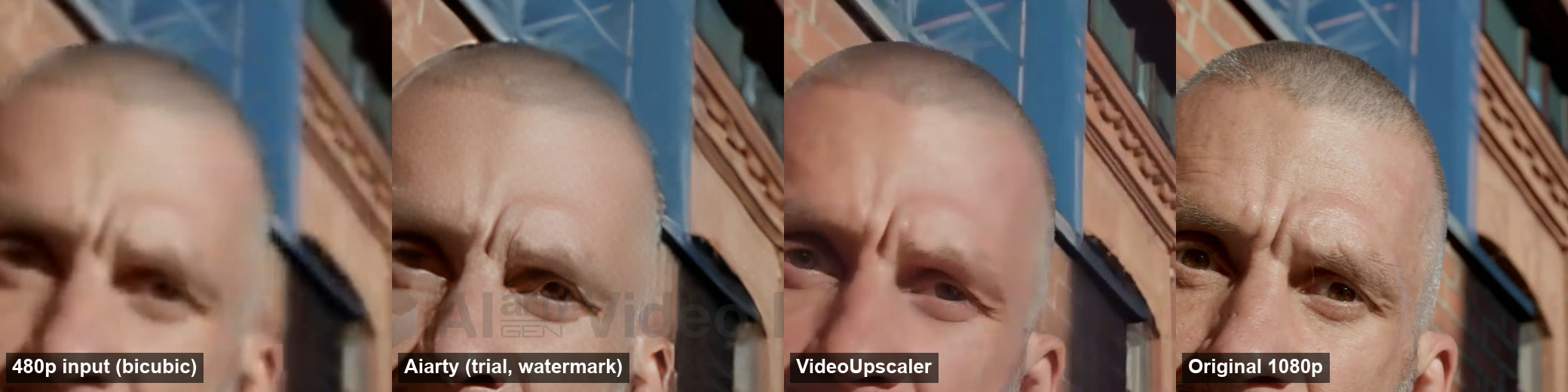
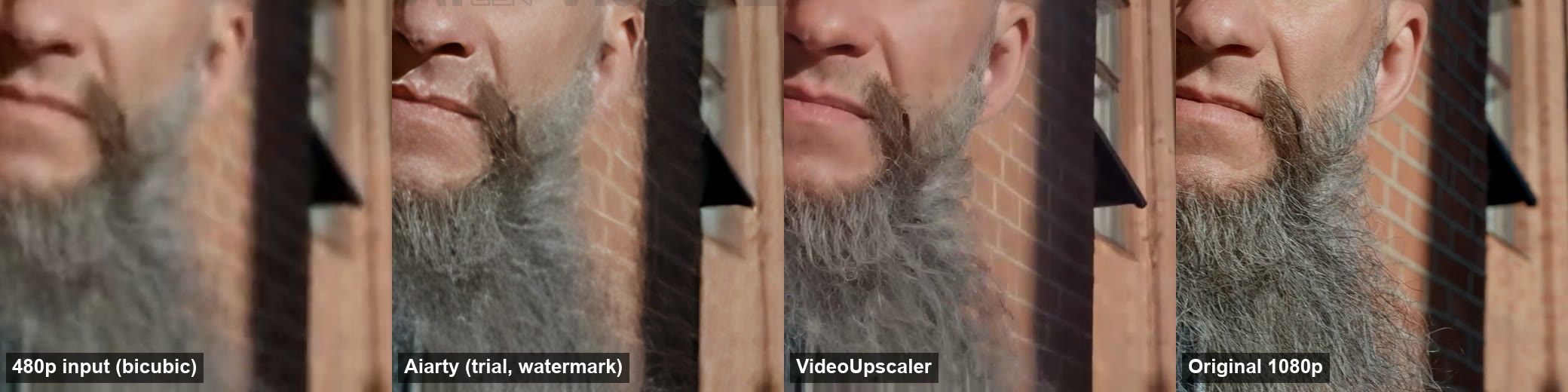
- Our same-clip test: 480p to 1080P took Aiarty about 8 s on an M5 Pro Mac and VideoUpscaler about 40 s; Aiarty's skin is sharper, our beard and brick detail sit closer to the original.
- Alternatives: VideoUpscaler and TensorPix (browser), Video2X (free), Topaz Video (past 4K).
Aiarty Video Enhancer is a desktop AI upscaler sold as a one-time license, its main draw in 2026 now that Topaz is subscription only. We make VideoUpscaler, one of the alternatives below; every other fact comes from official vendor pages. Prices are in USD.
Try a browser alternative to Aiarty
New accounts get 10 free credits (10 seconds of 1080P). No GPU, nothing to install.
What is Aiarty Video Enhancer?
It is a Windows and Mac app from Digiarty that upscales video to 4K and repairs noise, blur and low light with AI models. Version 3.8 is the latest release listed on its site.
It ships three upscaling models:
- moDetail-HQ v3 for hair, skin, plants and fine texture, at 2×, 4×, 1K, 2K or 4K.
- Smooth-HQ v3 for gentle deblur and denoise that keeps colors faithful.
- superVideo vHQ for very noisy, low-light or dark indoor clips, at 2× only.
Around the models it adds frame interpolation to 60, 90 or 120 fps, slow motion, SDR-to-HDR conversion (labeled experimental), audio denoise, color controls and batch export.
How much does Aiarty Video Enhancer cost in 2026?
It costs $165 for a lifetime license with free upgrades, as listed on its store on 10 October 2026 (list price $235). One license covers up to 3 PCs or 3 Macs, but only one operating system; there is no cross-platform license.
Bundles are also sold: Image Enhancer plus Video Enhancer for $199, and an Ultimate bundle with Image Matting for $259. The refund policy allows refunds within 30 days, tied mainly to bugs support cannot fix.
The free trial needs no signup. In the app, Aiarty states the trial limits plainly: no batch export, each export capped at 2 minutes, and a watermark on every export. The trial screen also mentions a 1-year license, which the store page did not list on 10 October 2026.
What computer does Aiarty need?
Aiarty needs Windows 10 or later, or macOS 13 or later on Intel or Apple silicon. Aiarty lists 8 GB of RAM as the minimum and 16 GB as recommended, and a GPU with at least 4 GB of VRAM, 8 GB recommended.
On Windows it uses DirectML or NVIDIA TensorRT; on a Mac it uses Metal, Core ML and the Neural Engine. Processing speed depends on that GPU, so an older laptop will be much slower than a desktop card.
How does Aiarty compare with VideoUpscaler on the same clip?
On a 5-second 480p clip upscaled to 1080P, Aiarty finished in about 8 seconds on an Apple M5 Pro Mac; VideoUpscaler took about 40 seconds from submit to download link. Both recovered far more detail than a plain resize.
We ran the test on 10 October 2026. The clip is 5 seconds of a bearded man on a street, cut from a 4K stock video and degraded to 854×480 with blur and heavy compression. The untouched 4K footage, scaled to 1080p, is the reference neither tool saw.
- Aiarty: version 3.8 trial, moDetail-HQ v3, 1080P preset (1922×1080), Turbo off, default strength, on a MacBook with an Apple M5 Pro.
- VideoUpscaler: 1080P on our production cloud GPU. The GPU worker spent 20.9 seconds on the job; the rest was queue and transfer.
| Same 5-second 480p clip to 1080P | Aiarty Video Enhancer 3.8 | VideoUpscaler |
|---|---|---|
| Where it ran | Apple M5 Pro Mac, local | Cloud GPU, browser upload |
| Time to finished file | about 8 s | about 40 s (20.9 s on the GPU) |
| Output size | 1922×1080 | 1920×1080 |
| Cost of this run | Free trial, watermarked | 5 credits (about $0.15 on the $29.90 plan) |
What the crops show: Aiarty draws stronger skin texture and a sharper face, with a slightly grainy, etched look on the forehead. VideoUpscaler keeps skin smoother, and its beard strands and brick edges sit closer to the original. Neither output matches the original 1080p frame.
Aiarty's own published claim is real-time speed in Turbo mode on an NVIDIA RTX 5090. On a fast Apple silicon Mac it was already quicker than our cloud round trip for a short clip; on an older laptop without a strong GPU it will be slower.
Where does Aiarty fall short?
Aiarty's limits come from being a local desktop app:
- 4K is the ceiling. It does not output 8K or above.
- Your hardware sets the speed. A recent Apple silicon Mac or an 8 GB VRAM card is fast; older laptops are not.
- One OS per license. Switching from Windows to Mac means buying again.
- No browser or phone version. You can only use it where it is installed.
- The trial caps each export at 2 minutes and watermarks it.
Aiarty Video Enhancer alternatives compared
This table compares six alternatives on the facts each vendor publishes, with Aiarty in the last row for reference.
| Tool | Runs on | Cheapest paid plan | Free option | Max output | Needs your GPU |
|---|---|---|---|---|---|
| VideoUpscaler | Browser (cloud GPU) | $29.90/mo for 1,000 credits | 10 credits, watermark | 4K | No |
| TensorPix | Browser (cloud GPU) | $5.50/mo billed yearly | About 5 min, 720p input | 4K | No |
| Video2X | Windows, Linux, Colab | Free, open source | Free | Depends on model | Yes (Vulkan), or Colab |
| Topaz Video | Windows, Apple silicon Mac | $299/yr or $59/mo | No desktop trial | Up to 16K | Yes, 6-8 GB VRAM |
| AVCLabs Video Enhancer AI | Windows, Mac | $95.96/yr (1 PC) | Trial | 8K | Yes, 4 GB+ VRAM |
| HitPaw VikPea | Windows, Mac, mobile, web | $99.99/yr (1 device) | Preview only | 8K | Desktop yes; cloud option |
| Aiarty Video Enhancer (reference) | Windows, Mac | $165 one-time (3 PCs or Macs) | Clips up to 120 s | 4K | Yes, 4-8 GB VRAM |
No GPU? Compare in the browser
Run 10 seconds of your clip at 1080P for free and check the before/after slider.
The 6 best Aiarty Video Enhancer alternatives in 2026
Each alternative is matched to the reason you might skip Aiarty, not ranked by output quality, since no shared benchmark exists.
1. VideoUpscaler: best if you have no GPU
VideoUpscaler runs FlashVSR, a diffusion video super-resolution model, on cloud GPUs. You upload a clip in the browser, pick 1080P, 2K or 4K, and download the result. It works the same on a Mac, a Chromebook or a laptop with integrated graphics. The 4K video upscaler page shows sample results.
It bills per second of video: 1 credit per second at 1080P, 2 at 2K and 3 at 4K. The $29.90 monthly plan gives 1,000 credits, about 16 minutes of 1080P. New accounts get 10 free credits with a small watermark; failed jobs are refunded. On our GPU, a 10-second 360p clip reached 1080P in 41.2 seconds.
Where it falls short: it only upscales, with no frame interpolation, HDR or color tools, and files must be under 500 MB. If you upscale hours a month, Aiarty's one-time price works out cheaper. See the pricing page to compare.
2. TensorPix: cheapest browser option
TensorPix is a browser tool from $5.50 a month billed yearly, with credits that roll over; one credit covers about 2 minutes of video. It adds denoise, interpolation to 60 fps and stabilization. The free plan limits input to 720p.
Best for: long, low-resolution clips when cost per minute matters more than speed.
3. Video2X: best free alternative
Video2X is free and open source (AGPL-3.0). It bundles Real-ESRGAN, Real-CUGAN and Anime4K for upscaling and RIFE for frame interpolation, and runs on Windows or Linux with any Vulkan GPU, or on Google Colab.
Best for: technical users and anime fans who will trade setup time for a zero price. See Anime4K vs Real-ESRGAN to pick a model.
4. Topaz Video: best for output above 4K
Topaz Video, formerly Topaz Video AI, goes up to 16K and has more models than Aiarty, including Starlight cloud models. It is subscription only since October 2025, from $299 a year or $59 a month, with no desktop trial. It needs a 6 to 8 GB VRAM GPU on Windows or an Apple silicon Mac.
Best for: professionals who need 8K or Premiere and Resolve plugins. If price is the issue, see what Topaz offered on Black Friday.
5. AVCLabs Video Enhancer AI: most repair tools
AVCLabs costs $95.96 a year or $149.90 for a perpetual license on one PC. It outputs up to 8K and adds stabilization, face refinement, colorization, deinterlacing and object removal on top of upscaling.
Best for: old footage that needs several repairs, not just more pixels.
6. HitPaw VikPea: works on phone and desktop
HitPaw VikPea runs on Windows, Mac, iOS, Android and the web, from $99.99 a year for one device. It covers upscaling, frame interpolation to 120 fps, a face model, colorization and low-light enhancement. The free version only previews results.
Best for: people who edit on a phone as well as a computer.
Aiarty Video Enhancer vs Topaz Video: which costs less?
Aiarty costs less over time: $165 once against Topaz Video's $299 every year. Aiarty also asks less of your hardware, with a 4 GB VRAM minimum against Topaz's 6 GB.
Topaz is still ahead on range. It outputs up to 16K, offers more models and plugins for editing software, and has cloud rendering credits. If you never need more than 4K, Aiarty is the cheaper of the two. If you need 8K or pro plugins, Aiarty cannot replace Topaz.
Which should you choose?
- You have a recent Apple silicon Mac or an 8 GB VRAM GPU and want to pay once: keep Aiarty.
- No dedicated GPU, a Chromebook, or a work laptop: VideoUpscaler or TensorPix.
- Zero budget: Video2X.
- Output above 4K: Topaz Video, AVCLabs or HitPaw VikPea.
- Many repairs on old footage: AVCLabs.
What this post leaves out
This post covers dedicated upscalers. For a wider list that includes video editors, read the best AI video enhancers of 2026.
For how upscaling works and how to judge a result, read how to upscale a video without losing quality.
When is Aiarty the better choice?
- When you process hours of video a month on your own GPU; one license beats per-second billing at that volume.
- When the footage cannot leave your computer; browser tools upload it.
- When you need frame interpolation or HDR in the same app.
- When your files are larger than 500 MB, the VideoUpscaler upload limit.
FAQ
Is Aiarty Video Enhancer free?
No. Aiarty has a free trial that processes clips up to 120 seconds without signup, but full use needs a $165 lifetime license, as listed on its store on 10 October 2026.
Does Aiarty add a watermark to free exports?
Yes. In our test on 10 October 2026, the Aiarty 3.8 trial put an Aiarty Video Enhancer watermark on the export and capped each export at 2 minutes. The paid license removes both limits.
Is Aiarty a one-time purchase?
Yes. Aiarty sells a lifetime license with free upgrades for up to 3 PCs or 3 Macs, one operating system per license. It does not list a subscription for Video Enhancer.
Does Aiarty work on Mac?
Yes, on macOS 13 or later, on both Intel and Apple silicon Macs. A Windows license does not cover a Mac; you buy each OS separately.
Is Aiarty better than Topaz Video AI?
Aiarty is cheaper ($165 once versus $299 a year) and needs less VRAM. Topaz offers output up to 16K, more models and editing plugins. Pick by whether you need more than 4K.
What is the best free alternative to Aiarty Video Enhancer?
Video2X is free and open source, with Real-ESRGAN, Real-CUGAN, Anime4K and RIFE. It needs a Vulkan GPU on Windows or Linux, or a free Google Colab session.
Is there an online alternative to Aiarty Video Enhancer?
Yes. VideoUpscaler and TensorPix run in the browser on cloud GPUs, so they work without a dedicated graphics card. VideoUpscaler bills 1, 2 or 3 credits per second for 1080P, 2K or 4K.
Check your GPU first. If it has 8 GB of VRAM and you upscale often, try Aiarty's trial; if not, run a 10-second clip through a browser tool before you buy anything.
Upscale without installing anything
10 free credits for new accounts. 1080P, 2K or 4K, billed per second.
Sources
All checked on 10 October 2026.
- Aiarty Video Enhancer: product page, store, tech specs
- Topaz Labs: pricing, system requirements
- Video2X: github.com/k4yt3x/video2x
- TensorPix: pricing
- AVCLabs: purchase page
- HitPaw VikPea: purchase page
- VideoUpscaler: pricing